
Android App Links: assetlinks.json Setup and Testing
An Android App Link only works when your site publicly declares that your app owns the domain. Here is the assetlinks.json file, the manifest side that has to match it, what 12 large sites actually serve, and how to find the failure when links open in the browser instead.
An Android App Link is an HTTPS URL that Android is willing to hand straight to your app, because your website publicly declared that the app owns it. The declaration is a JSON file called assetlinks.json, served at https://<your-domain>/.well-known/assetlinks.json. Android fetches it, checks that the signing certificate of the installed app matches the fingerprint in the file, and from then on routes matching links into the app with no "open with" dialog. If any of that fails, the link opens in the browser on Android 12 and later (or shows an app chooser on older versions), and nothing in the app tells you why.
Below: the file, the manifest side that has to match it, what 12 large sites served on 2026-10-12, and how to find the failure when links open in the browser.
What goes in the file
A complete example for a single app. The package name and both fingerprints are placeholders:
[{
  "relation": ["delegate_permission/common.handle_all_urls"],
  "target": {
    "namespace": "android_app",
    "package_name": "com.example.shop",
    "sha256_cert_fingerprints": [
      "14:6D:E9:83:C5:73:06:50:D8:EE:B9:95:2F:34:FC:64:16:A0:83:42:E6:1D:BE:A8:8A:04:96:B2:3F:CF:44:E5",
      "AA:BB:CC:DD:EE:FF:00:11:22:33:44:55:66:77:88:99:AA:BB:CC:DD:EE:FF:00:11:22:33:44:55:66:77:88:99"
    ]
  }
}]
The whole file is an array of statements. This one grants link-handling permission to one app.
| Field | What it does |
|---|---|
relation |
The permission being granted. delegate_permission/common.handle_all_urls is the one that opens links in your app. |
target.namespace |
android_app for an Android app. |
target.package_name |
Your application ID from build.gradle, not your app's display name. |
target.sha256_cert_fingerprints |
SHA-256 fingerprints of the signing certificates allowed to handle links. Uppercase, colon-separated: Google's troubleshooting guide lists a lowercase fingerprint as a common failure. |
The array accepts more than one fingerprint, which is how you support a debug build and a release build at the same time. Google's documentation gives debug and production builds as the example.
The Play App Signing fingerprint trap
If you use Play App Signing, a fingerprint generated locally is usually the wrong one for release builds.
keytool -list -v -keystore my-release-key.keystore
That reads the keystore on your machine. With Play App Signing, the certificate on users' devices is not the one in your local keystore. The official docs put it plainly: the fingerprint produced by running keytool locally "will usually not match the one on users' devices."
The correct fingerprint is on Play Console's App signing page, next to a ready-made Digital Asset Links snippet. Google's pages give two menu paths for it, Release > Setup > App signing and Protected with Play > Play Store protection > Manage Play app signing, so use whichever your console shows. If links work in your debug build and fail in the release build, or the reverse, check this first.
If you use ChottuLink, along with your local debug key fingerprint also add the Play App Signing fingerprint from Play Console into the dashboard's SHA-256 field ; Refer ChottuLink Android setup guide
Where it lives, and what the server has to do
The path is fixed. Android queries one location:
https://<domain>/.well-known/assetlinks.json
Google's publishing requirements list four server requirements:
| Requirement | Detail |
|---|---|
| Content type | Served as application/json. |
| Transport | HTTPS, even if your intent filters declare http. |
| Redirects | None. No 301 or 302. |
| Coverage | If the manifest declares several hosts, each host needs its own copy of the file. |
Putting www.example.com and mobile.example.com in the same intent filter does not mean one file covers both. Each hostname is queried separately. On Android 12 and later each host verifies on its own; on Android 11 and lower, one host that fails means none of your App Links verify. A wildcard host such as *.example.com needs the file at the root, https://example.com/.well-known/assetlinks.json.
There is a related trap on the app side. Do not ship a manifest containing hosts that only resolve on your VPN or behind basic auth. Android fetches the file from wherever the device is, and a host the public internet cannot reach will not verify. The documented workaround is build variants, so dev and release manifests differ.
What real production hosts publish
Method: on 2026-10-12 we requested /.well-known/assetlinks.json from 12 large production domains chosen by hand, from one IP address, with a plain curl and no custom user agent. We recorded status, content type and redirect count, then parsed each body as JSON. That covers three of the four requirements above; per-host coverage was not tested. Nothing here was tested on a device.
| Host | Status | Content-Type | Statements | Fingerprints |
|---|---|---|---|---|
| google.com | 200 | application/json | 29 | 53 |
| www.youtube.com | 200 | application/json | 6 | 8 |
| www.amazon.com | 200 | application/json | 33 | 33 |
| www.netflix.com | 200 | application/json | 7 | 13 |
| open.spotify.com | 200 | application/json; charset=utf-8 | 7 | 14 |
| www.nytimes.com | 200 | application/json | 11 | 23 |
| www.uber.com | 200 | application/json | 42 | 42 |
| www.airbnb.com | 200 | application/json | 61 | 4 |
| www.duolingo.com | 200 | application/json | 3 | 2 |
| github.com | 200 | application/json | 3 | 4 |
| www.reddit.com | 200 | application/json | 3 | 3 |
| www.linkedin.com | 200 | application/json | 114 | 10 |
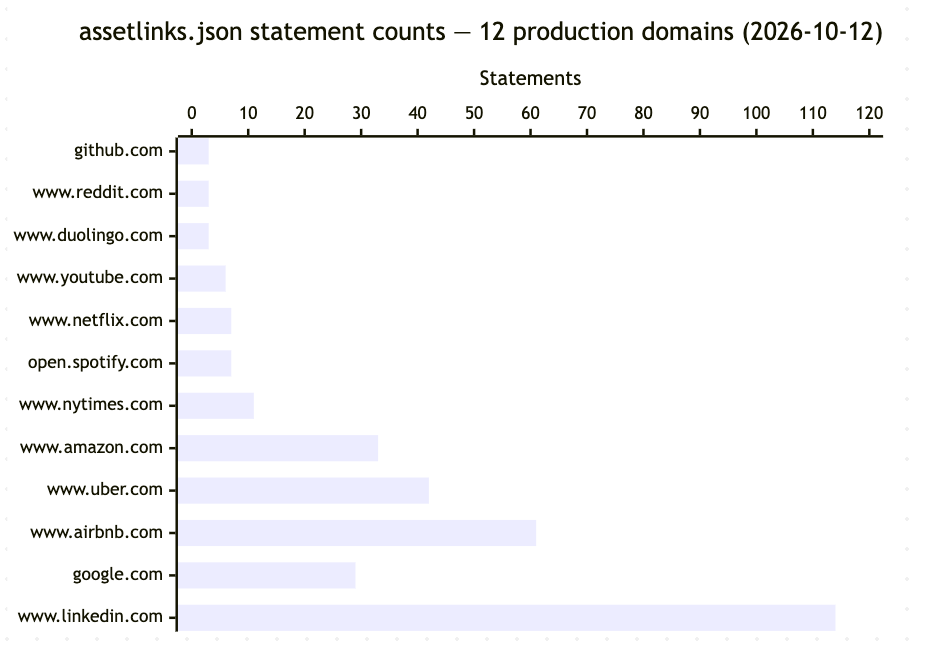
What the 12 files show:
All 12 returned 200 and application/json with no redirects on that day.
File size varies a lot. These 12 hosts publish 319 statements and 209 fingerprints between them, from 3 statements (GitHub, Reddit, Duolingo) to 114 (LinkedIn). A file covering one app needs only one statement. We did not trace why each individual statement is present.
Two namespaces appear. 154 statements use android_app, which targets an app. 165 use web, which targets a website rather than an app. Of the web statements, 59 grant only get_login_creds and 106 include handle_all_urls, so a file that looks confusingly large is not necessarily all link handling.
get_login_creds appears 139 times in the sample and use_as_origin 5 times, alongside 259 uses of handle_all_urls. Those are relations that have nothing to do with link handling.
None of these 12 sites serves Android 15's dynamic rules
Android 15 added a relation extension, dynamic_app_link_components, that lets a site define link-matching rules server-side. It sits inside a statement's relation_extensions field, and across all 319 statements from these 12 hosts that field is absent.
That is not a reason to avoid the feature. It does mean that in this sample of 12 sites, none serves dynamic rules in the file a plain curl receives on 2026-10-12. Responses that vary by user agent were not tested.
The manifest side
The file and the app have to agree. A minimal verifying filter for one host looks like this. Google's intent-filter guide says it must include <data> elements for both http and https:
<activity android:name=".MainActivity" android:exported="true">
  <intent-filter android:autoVerify="true">
    <action android:name="android.intent.action.VIEW" />
    <category android:name="android.intent.category.DEFAULT" />
    <category android:name="android.intent.category.BROWSABLE" />
    <data android:scheme="http" />
    <data android:scheme="https" />
    <data android:host="www.example.com" />
  </intent-filter>
</activity>
If your app targets Android 12 (API level 31) or higher, an activity with an intent filter must set android:exported, or the app will not install on Android 12 and later devices.
android:autoVerify="true" is what tells Android to check the statement at install time. Without it, verification does not run. The categories are not optional either: BROWSABLE is what makes the filter reachable from a browser, and DEFAULT is what lets your activity receive implicit intents.
Combining data elements widens the scope
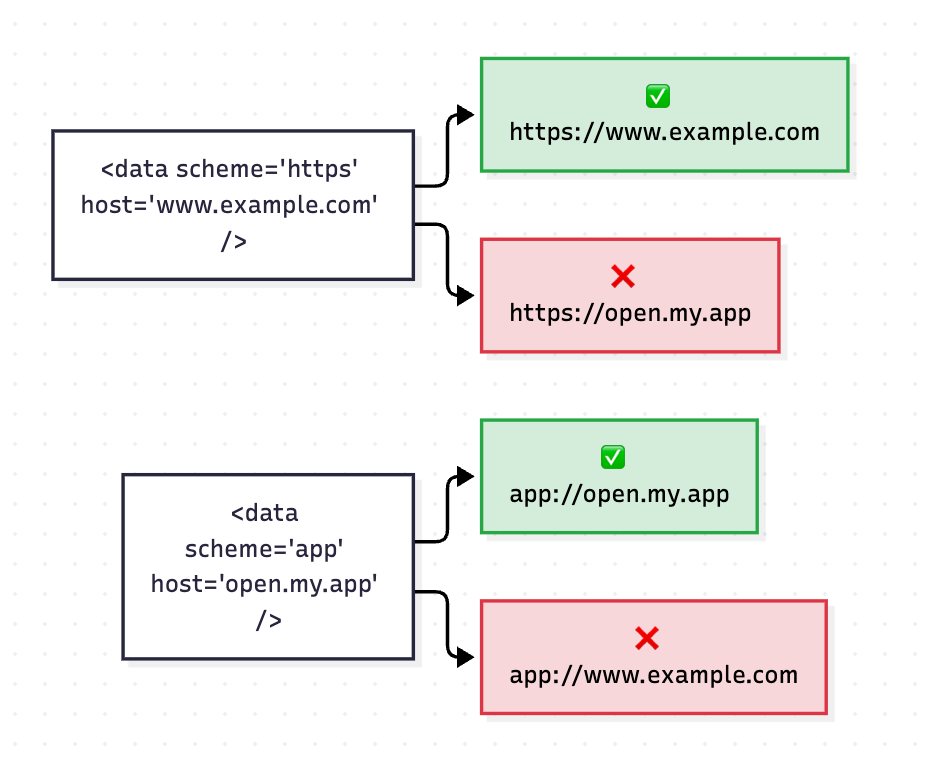
This one is easy to miss. Multiple <data> elements inside one intent filter are merged, not treated as alternatives. From the deep-linking guide:
<intent-filter>
  <data android:scheme="https" android:host="www.example.com" />
  <data android:scheme="app" android:host="open.my.app" />
</intent-filter>
That looks like it handles https://www.example.com and app://open.my.app. It also handles app://www.example.com and https://open.my.app, because the attributes are cross-multiplied. If you want two independent URL shapes, use two intent filters. In an autoVerify filter, adding a custom scheme also stops verification, per Google's intent-filter guide.
The same page notes that pathPrefix requires a leading slash: pathPrefix="/gizmos", not pathPrefix="gizmos".
Finally, read the incoming URL from intent.data at every entry point your activity has. Google's Studio guide shows the pattern: one handler called from both onCreate and onNewIntent, so a link tapped while the app is already running is not missed.
Verification, and what Android 15 changed
At install, Android inspects every intent filter that declares ACTION_VIEW, the BROWSABLE and DEFAULT categories, and an http or https scheme. For each distinct hostname it finds, it requests https://<hostname>/.well-known/assetlinks.json, checks for a statement matching your package name, and compares the certificate used to sign the installed app against the fingerprints in the file. If everything matches, your app becomes the verified handler for that host.
Two behaviors follow from how that works.
When two apps claim the same host and path, only the most recently installed one receives web intents. Lite and full versions of the same app will fight over the domain, and the loser silently stops getting links.
On Android 12 and later, web links that are not verified App Links generally open in a web browser by default. Google's pages describe this unevenly: the deep-linking guide also says unverified web links "will almost always trigger the disambiguation dialog, meaning that they are likely to be handled by the user's web browser." Either way, the common outcome of a broken App Link on a modern device is the default browser, not a chooser.
Dynamic App Links
On Android 15 (API level 35) and later, devices with Google services installed periodically re-fetch assetlinks.json instead of only reading it once at install. The file stops being a static declaration and becomes configuration you can change.
That enables dynamic_app_link_components, defined inside relation_extensions:
[{
  "relation": ["delegate_permission/common.handle_all_urls"],
  "target": {
    "namespace": "android_app",
    "package_name": "com.example.app",
    "sha256_cert_fingerprints": ["..."]
  },
  "relation_extensions": {
    "delegate_permission/common.handle_all_urls": {
      "dynamic_app_link_components": [
        {"/": "/products/*"},
        {"/": "/shoes", "?": {"in_app": "true"}},
        {"#": "app"},
        {"/": "*", "exclude": true}
      ]
    }
  }
}]
The matcher keys in each rule object are:
| Key | Matches |
|---|---|
/ |
The URL path |
# |
The URL fragment |
? |
A dictionary of query parameter names and value patterns |
exclude |
Marks that rule as blocking the app rather than opening it |
Wildcards are * for zero or more characters, ? for exactly one, and ?* for one or more. The ? dictionary does not need to match every query parameter, but every entry in it has to be found.
Four rules govern these and all four are documented, so take them from the source:
- Order matters, first match wins. An early
{"/": "*", "exclude": true}rule excludes everything and makes every later rule unreachable. - If nothing matches, the link does not open your app. Dynamic rules are not additive with a default-allow. A rule list of
{"/": "/path1"}and{"/": "/path2"}excludes everything else. - Dynamic rules cannot expand the manifest's scope. They apply only within the hosts and URL rules the manifest declares. The recommended pattern is a broad manifest entry (scheme and domain) with refinement moved into the file.
- Declare
dynamic_app_link_componentsonce per site, relation and app. If it appears more than once, Android does not guarantee which set it uses.
Two more details matter if you adopt this. Malformed or empty fields cause Android to discard the entire dynamic ruleset and fall back to the manifest, so one malformed field reverts your configuration. And devices on Android 14 and earlier ignore the extension fields altogether, which makes the behavior differ by device in a way that looks like a bug.
That broad-manifest pattern has a cost on older devices. Android 14 and lower ignore the path rules in the file, so a filter declaring only a scheme and host opens every path on your domain in the app. Google's documented fallback is a deliberately non-matching android:path in the manifest plus a <uri-relative-filter-group> that only Android 15 and later reads. With that group in place, a missing or invalid assetlinks.json means no links open the app on Android 15 and later.
You should care about this if you want to change link routing without shipping an app build — A/B testing which paths open in the app, or excluding a section of the site after launch. If you are not doing that, the manifest alone is simpler and every device supports it. As of Google's App Links tools page (updated 2026-10-06), Android Studio's App Links Assistant does not generate dynamic rules.
Debugging by symptom
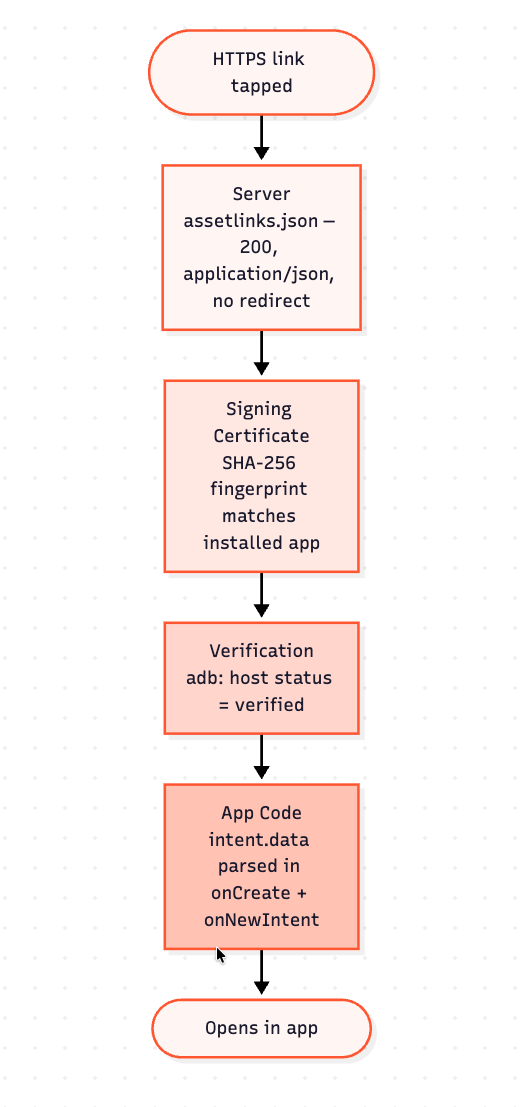
Google keeps its own troubleshooting page; this table orders the same checks by symptom. The "what good looks like" column is what Google's documentation describes; we did not observe it on a device.
| Symptom | Check | What good looks like | Layer |
|---|---|---|---|
| 404 or a login page at the path | curl -I https://<host>/.well-known/assetlinks.json |
200, no Location header |
Server |
Serves HTML or text/plain |
Same, reading Content-Type |
application/json |
Server |
| Redirects | Watch for a 301 or 302 | No redirect at all | Server |
| Correct file, link still opens Chrome | Play App Signing certificate | Fingerprint matches Play Console | Signing |
| Release build fails, debug works | Compare the two fingerprints | Both listed in the file | Signing |
| File and signing correct | adb shell pm get-app-links <package> |
Each host listed as verified |
Verification |
| Verifies on one host, not another | curl -I https://example.com./.well-known/assetlinks.json (trailing dot) |
Same file as without the dot | Server |
| Verified but the wrong screen opens | App-side intent handling; check that only one activity declares the filter | Path parsed from intent.data |
App code |
| Verified, but links open in the browser for one user | Your app's Open by default settings screen (path varies by device) | "Open supported links" is on | Device settings |
The commands
Google's deep-linking guide gives this form to check that a URI resolves to your activity, on a connected device or emulator:
adb shell am start -W -a android.intent.action.VIEW \
  -d "https://www.example.com/products/123" com.example.shop
Naming the package forces delivery to your app, so it cannot tell you whether verification would have routed the link there. To test the resolution Android performs on a real tap, drop the package name and add the BROWSABLE category. This is the form the verification guide gives; wait at least 20 seconds after installing before running it:
adb shell am start -W -a android.intent.action.VIEW \
  -c android.intent.category.BROWSABLE \
  -d "https://www.example.com/products/123"
On Android 12 (API level 31) and later, this clears the stored link-handling state for your package:
adb shell pm set-app-links --package com.example.shop 0 all
Resetting is not the same as verifying. Follow it with pm verify-app-links --re-verify com.example.shop to trigger a fresh verification, wait a few minutes, then run pm get-app-links com.example.shop to read the result. If your app targets Android 11 or lower, enable the updated verification first with adb shell am compat enable 175408749 com.example.shop. These pm subcommands do not exist on Android 11 and lower.
pm get-app-links and pm verify-app-links --re-verify read and force verification state, and both are documented in the verification guide. The Digital Asset Links documentation is the reference for the file itself. Without a device, you can ask Google's servers what they can see for a domain. This asks Google's Digital Asset Links API what it sees for the host, the check Google's testing guide recommends. The answer is cached and lists one statement per package and fingerprint, so its count will not match your file. Add &return_relation_extensions=true to see dynamic rules:
curl -sS "https://digitalassetlinks.googleapis.com/v1/statements:list?\
source.web.site=https://github.com&\
relation=delegate_permission/common.handle_all_urls"
And if you would rather not open a terminal, ChottuLink's Deep Link Tester is a free browser tool that checks Android App Links, iOS Universal Links and web fallbacks without a signup.
Per Google's App Links tools page, Play Console has a deep links dashboard under Grow > Deep links that reports configuration errors and can push link fixes live without a new app release. Per the deep-linking guide, on Android 17 and later am start also accepts a --debug-link flag that diagnoses how the system resolved a URL and which rules matched.
Three places to check first
Three places to look, from the most mechanical to the most app-specific:
- The fingerprint does not match the installed app. Play App Signing re-signs your app, so a locally generated fingerprint is the wrong one. Get the value from Play Console.
- The manifest does not verify, or verifies more than you meant. A missing
autoVerify, a missingBROWSABLEcategory, apathPrefixwithout its leading slash, or two<data>elements merged into a scope you did not intend. - The file is not where or how Android looks. Wrong path, wrong content type, a redirect in front of it, or no copy on one of the hosts in your manifest.
FAQ
Do Android App Links work on every Android version?
App Links work from Android 6.0 (API level 23) and later, on devices with Google services. Verification is automatic from that version. On Android 12 and later, Google's docs say unverified web links generally open in the browser by default, so a broken setup usually looks like the link opening in the browser.
What is the difference between a deep link and an App Link?
| Deep link | Android App Link | |
|---|---|---|
| Scheme | Any, including custom (myapp://) |
http or https |
| Domain proof | None | assetlinks.json plus certificate match |
| What happens on tap | Android resolves the intent; with more than one match the user may see a chooser, and on Android 12+ unverified web links generally open in the browser | Opens your app directly once verified |
| Can be intercepted | Yes, another app can register the same scheme | Verification is designed to prevent it |
An App Link is a deep link that has been verified.
Can two apps claim the same domain?
Yes, as long as they handle different paths: several apps can each verify against one domain. If two apps resolve the exact same host and path, as a lite and full version might, only the most recently installed one receives web intents for it.
Do I have to re-verify after changing the file?
On Android 15 and later, devices with Google services re-verify in the background, and Google says a change can take up to seven days to reach every device. On Android 14 and lower, a change is typically picked up only when the app is installed or updated. To test a change on one device, reset the state with pm set-app-links and run pm verify-app-links --re-verify <package>, or reinstall. Google warns that server-side caching can still serve the old file for a few hours.
Does this work with Flutter or React Native?
The assetlinks.json file and the verification rules are identical, because Android performs the verification, not the framework. What differs is how the framework declares the intent filter, which in both Flutter and React Native is still the native AndroidManifest.xml, and how it passes the URL to your code. Flutter also has a Deep Link Validator, listed on Google's App Links tools page.