
Why Rich Social Link Previews Can Boost Your Click-Through Rate by Up to 150%
How link preview optimization transforms social sharing and drives measurable engagement
The Power of First Impressions in Social Sharing
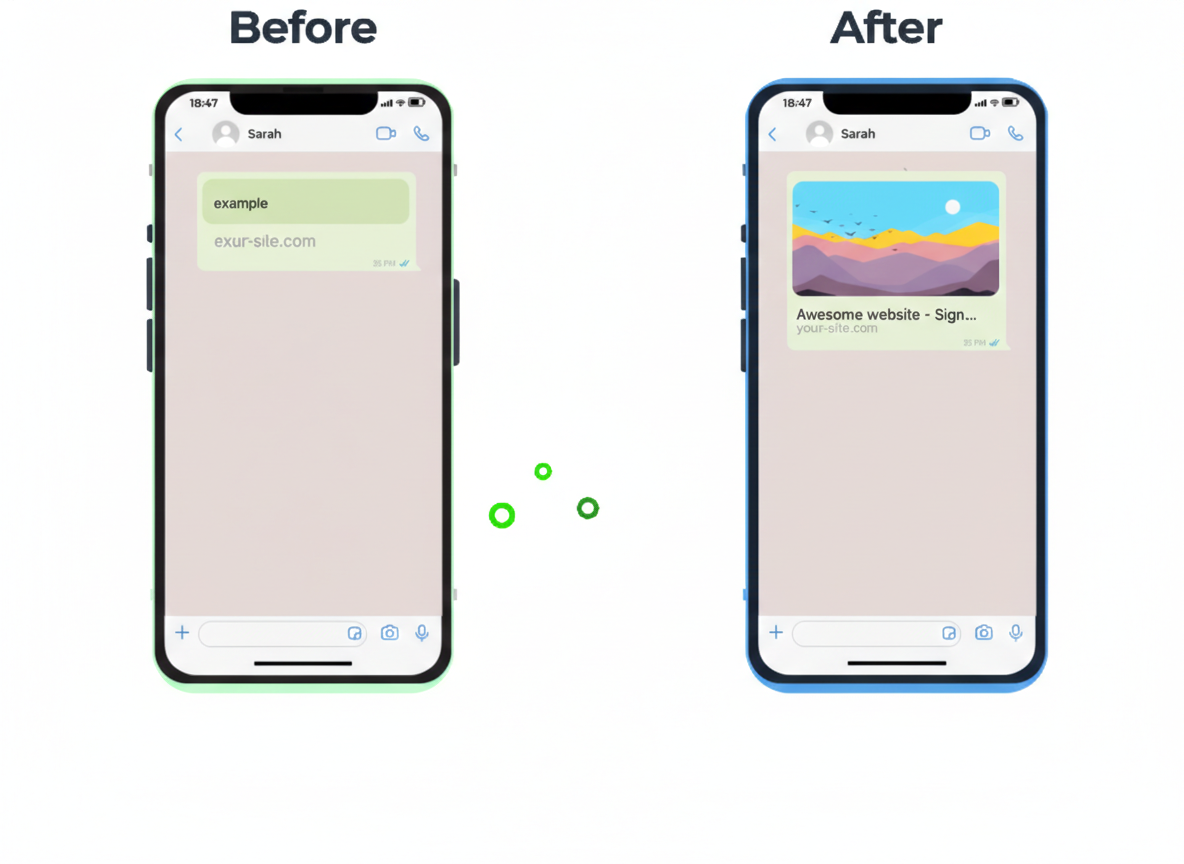
When you share a link on social media, you have mere milliseconds to capture attention in an endless scroll of content. Rich social link previews: those eye-catching cards with images, titles, and descriptions that appear when you paste a URL, they can make the difference between a scroll-past and a click-through.
For mobile app marketers, SaaS founders, and digital marketers, optimizing link previews isn’t just about aesthetics. It is about conversion, credibility, and click-through rates.
What Are Rich Social Link Previews?
Rich link previews (also called Open Graph previews or Twitter Cards) are the enhanced visual representations of your links that appear when shared on platforms like:
- Twitter/X: Summary cards with large images
- Facebook & LinkedIn: Open Graph cards with thumbnails and descriptions
- Slack & Discord: Embedded preview cards
- WhatsApp & Telegram: Rich media previews
These previews pull metadata from your webpage (specifically Open Graph tags, Twitter Card tags, and structured data) to create compelling visual previews that encourage clicks.
The Data: How Much Do Link Previews Actually Matter?
Click-Through Rate Improvements
According to Buffer’s Social Media Research, posts with images receive 150% more reposts on X/Twitter compared to text-only posts.
When your links display rich previews with compelling images, they effectively become visual content.
Engagement Metrics from X/Twitter
Twitter’s own analysis found that posts with Summary Cards receive 2x the engagement compared to tweets with plain URLs.
This includes clicks, retweets, and replies, i.e the full engagement funnel.
These aren’t marginal improvements , we are talking about doubling or tripling your click-through rates simply by ensuring your links render with proper social previews.
Key Advantages of Rich Social Link Previews
1. Increased Click-Through Rates (CTR)
The primary benefit is simple: more clicks. Rich previews give users visual context before they click, building trust and curiosity simultaneously. When users see:
- A compelling image that relates to the content
- A clear, descriptive title that sets expectations
- A concise description that promises value
they’re significantly more likely to click through.
Use case for ChottuLink users:
When sharing deep links to your mobile app via social media, rich previews can showcase app screenshots, feature highlights, or promotional imagery , dramatically increasing install rates from social campaigns.
2. Enhanced Credibility and Trust
Links without previews look suspicious in 2026. A plain URL screams “risky click” to most users, especially on platforms where phishing and spam are concerns.
Rich previews signal:
- This is a legitimate, well-maintained website
- The destination is professional and trustworthy
- The content creator cares about user experience
3. Better Brand Recognition
Every link preview is a micro-branding opportunity. When your logo, brand colors, and visual identity appear in the preview card, you reinforce brand recall — even if users don’t click immediately.
For mobile apps using ChottuLink: Your deep links can display custom preview images featuring your app icon, brand colors, and compelling CTAs like “Open in App” or “Download Now” .. turning every shared link into a mini billboard.
4. Improved Social Algorithms
Social platforms prioritize content that generates engagement. When your links consistently earn higher CTRs due to rich previews, platforms like LinkedIn and Twitter interpret this as “quality content” and show your posts to more people organically.
It’s a virtuous cycle:
Rich Preview → Higher CTR → Better Engagement → Algorithm Boost → More Reach
5. Mobile-First User Experience
On mobile devices (where 80%+ of social media usage happens), rich previews are even more critical. They:
- Provide visual anchors in fast-scrolling feeds
- Reduce cognitive load (users scan images faster than text)
- Increase tap targets for better accessibility
Especially relevant for deep linking: When users click a ChottuLink deep link from mobile social apps, the rich preview can show them exactly where they’ll land inside your app, on a specific product, at a special offer…reducing friction and abandoned sessions.
6. Higher Conversion on Paid Campaigns
If you’re running paid social ads or promoting posts, rich link previews significantly improve ROI. The same ad spend yields more clicks and conversions when your link displays an optimized preview instead of a bare URL.
Essential Elements of an Optimized Link Preview
To maximize the benefits, your link previews should include:
Open Graph Tags (Facebook, LinkedIn, WhatsApp)
<meta property="og:title" content="Your Compelling Title" />
<meta property="og:description" content="A clear, benefit-focused description under 160 characters" />
<meta property="og:image" content="https://yourdomain.com/preview-image.jpg" />
<meta property="og:url" content="https://yourdomain.com/page" />
<meta property="og:type" content="website" />
Twitter Card Tags
<meta name="twitter:card" content="summary_large_image" />
<meta name="twitter:title" content="Your Compelling Title" />
<meta name="twitter:description" content="A clear, benefit-focused description" />
<meta name="twitter:image" content="https://yourdomain.com/twitter-image.jpg" />
Image Optimization Best Practices
- Dimensions: 1200×630px (Facebook/LinkedIn) or 1200×675px (Twitter large image)
- File size: Under 1MB for fast loading
- Format: JPG or PNG
- Content: Clear, high-contrast visuals with minimal text
Introducing ChottuLink’s Social Preview Tool
Testing and optimizing your link previews shouldn’t require developer tools or guesswork. ChottuLink’s Social Preview Tool lets you preview exactly how your links will appear across all major social platforms , before you hit publish.
Key Features:
Real-time preview across Twitter, Facebook, LinkedIn, and more
Instant validation of Open Graph and Twitter Card tags
Mobile and desktop views to see exactly what users see
Free to use: no signup required for basic previews
Perfect for:
- Mobile app marketers testing deep links before campaigns
- Content creators optimizing blog post shares
- SaaS teams ensuring product pages render beautifully
- Agencies managing client social media
Try the Social Preview Tool Now →
How ChottuLink Deep Links Leverage Rich Previews
For mobile app marketers, ChottuLink’s smart deep links go beyond basic link shortening. Every ChottuLink URL includes:
- Customizable Open Graph metadata: Set unique images, titles, and descriptions for each deep link
- Platform-optimized previews: Automatic rendering for Twitter, Facebook, LinkedIn, WhatsApp
- Deferred deep linking support: Show users exactly where they’ll land in your app
- Analytics integration: Track which previews drive the most installs and conversions
When you share a ChottuLink deep link to your app on social media, users see:
- Your app icon or promotional image
- A clear call-to-action (“Open in App” or “Download Now”)
- Contextual description of where they’ll land
This transparency builds trust and increases conversion rates by reducing friction in the social → app journey.
Start optimizing your deep links →
Best Practices: Optimizing Link Previews for Maximum CTR
1. Use High-Quality, Relevant Images
Your preview image is the first thing users notice. Use:
- High-resolution screenshots for app features
- Professional product photography for e-commerce
- Custom graphics with clear text overlays for blog posts
2. Write Compelling, Benefit-Driven Titles
Your title should immediately communicate value:
- ❌ “Product Update: New Feature Release”
- ✅ “Save 3 Hours Per Week with Our New Automation Feature”
3. Test Before You Share
Always validate your previews using tools like:
- ChottuLink Social Preview Tool (for comprehensive platform testing)
- Facebook Sharing Debugger
- Twitter Card Validator
4. Keep Descriptions Concise
You have ~160 characters. Use them to:
- State the primary benefit
- Create curiosity
- Include a subtle CTA
5. Update Previews for Campaigns
Don’t use generic previews for time-sensitive campaigns. Update your Open Graph tags for:
- Product launches
- Limited-time offers
- Seasonal promotions
Common Mistakes to Avoid
🚫 Using low-resolution images: Blurry previews destroy credibility
🚫 Forgetting mobile optimization: Most users will see your preview on mobile
🚫 Ignoring platform-specific requirements: Twitter and Facebook have different image ratios
🚫 Not testing before sharing: Always preview before posting publicly
🚫 Using generic stock photos: Custom, relevant imagery performs better
Measuring Success: Track Your Link Preview Performance
To validate the impact of optimized link previews, monitor:
- CTR from social platforms (via UTM parameters and analytics)
- Engagement rates (likes, comments, reshares on posts with links)
- Conversion rates from social traffic (using ChottuLink’s analytics)
- Bounce rates (optimized previews set accurate expectations, reducing bounces)
Pro tip: A/B test different preview images and titles to find what resonates with your audience. ChottuLink’s link management dashboard makes it easy to create multiple links and track performance.
Conclusion: Link Previews Are Low-Hanging Fruit
If you’re not optimizing your link previews, you’re leaving clicks — and conversions — on the table. The data is clear: rich social previews can double or triple your click-through rates with minimal effort.
For mobile app marketers using deep links, the impact is even greater. Every link you share is an opportunity to showcase your app, build trust, and drive installs.
Take Action Today:
- Test your current links using ChottuLink’s Social Preview Tool
- Optimize your metadata (Open Graph and Twitter Card tags)
- Create custom preview images for your most-shared links
- Track performance and iterate on what works
Already using deep links for your mobile app? Sign up for ChottuLink to automatically generate optimized link previews for every deep link you create — and start driving more installs from social media.
Further Reading
- Buffer’s Research on Visual Content Performance
- Twitter Cards Documentation
- Open Graph Protocol Specification
- ChottuLink Social Preview Tool
Optimize your links. Increase your clicks. Drive more conversions.