
QR Code Deep Links: Scan to Open Your App (iOS + Android, 2026 Guide)
A plain QR code opens a website. A QR code deep link opens your app to the exact screen you intended, even for users who have to install it first. Here is how the routing works and how to set one up.

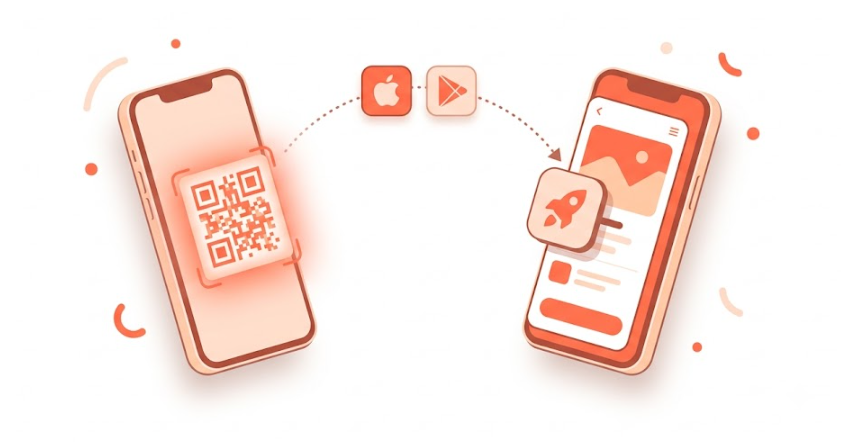
A QR code deep link sends a scanner directly to a specific screen inside your app, and if the app is not installed yet, it routes them to the App Store or Google Play, then delivers them to that same screen the moment they open the app for the first time. That second part, known as deferred deep linking, is what separates a QR code deep link from a QR code that just points at a website.
What Is a QR Code Deep Link?
A regular QR code points to a URL, usually a website. When scanned, it opens a browser and that is the end of the journey.
A QR code deep link does something different:
- Scanned on a device with the app installed: opens the app directly to a specific screen.
- Scanned on a device without the app: redirects to the App Store or Google Play, the user installs, and lands on the specific screen they were meant to see, not the home screen.
The second scenario is what makes QR code deep links useful for growth. The routing intent survives the install. A new user who scans a code on product packaging, at an event booth, or on a print ad ends up exactly where the campaign intended, even if they had to install the app first. This is deferred deep linking.
Uniqode, an enterprise QR code and digital business card platform, runs on this exact pattern. Uniqode relies on ChottuLink's enterprise infrastructure for the QR codes and deep links behind its Digital Business Card product, and the first 10 QR codes it generated through ChottuLink drove more than 500,000 clicks.
How the Routing Works
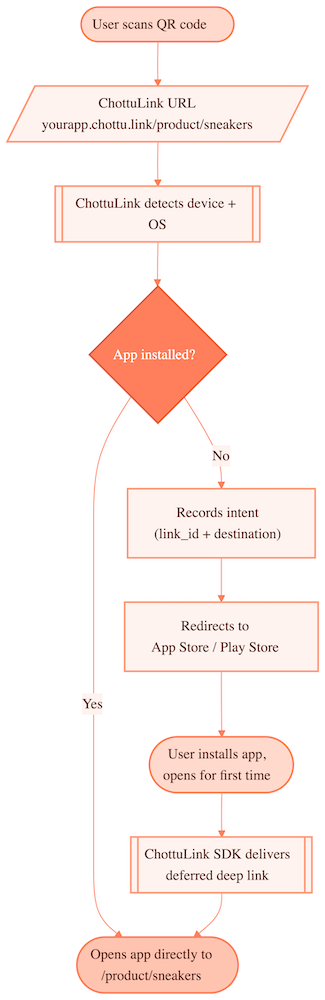
The user never sees the mechanics. From their perspective, they scanned a code and ended up exactly where they were supposed to be.
Real-World QR Code Deep Link Use Cases
Retail and ecommerce
- QR code on product packaging opens the specific product page in the app, pre-loaded for add-to-cart.
- QR code on a shelf-edge display opens loyalty rewards for that product category.
- QR code in an unboxing insert applies an exclusive discount automatically on first open.
Events and physical marketing
- Event booth QR: install a game or app, land on an event-specific challenge or promo.
- Print ad or billboard: scan, install, arrive with an exclusive offer pre-loaded.
- Conference badge QR opens an attendee's networking profile inside the event app.
Restaurants and hospitality
- Table QR code opens a menu item or loyalty program directly in the app.
- Hotel key card opens the in-stay services app to that room's service menu.
Streaming and gaming
- TV overlay or stream QR: viewer installs the game, joins the streamer's lobby (the deferred deep link delivers the lobby code).
- YouTube video description QR: install, land on the video-linked content in the app.
Print and direct mail
- Catalog or mailer QR routes to a personalized product selection, and campaign-level tracking shows which mailer drove which installs.
Creating a QR Code Deep Link with ChottuLink
Every ChottuLink link generates a QR code. No separate QR tool is needed, and QR codes are free and unlimited on every plan, including free. That is a meaningful gap versus Airbridge, whose free tier caps QR codes at 200, and versus link shorteners like Bitly and Rebrandly that meter QR generation on their lower tiers.
Option A: Dashboard (3 steps)
- Log in to app.chottulink.com.
- Create a new link:
- Title: internal label, e.g. "Summer Sale Package Insert"
- Destination URL: where users land on web or after install, e.g.
https://yourapp.com/summer-sale - Deep link path: the in-app destination, e.g.
/sale/summer2026 - Social preview: title, description, and image for when the link is shared in chat apps
- Download the QR code from the link detail page.
Option B: REST API
curl -X POST 'https://api2.chottulink.com/chotuCore/pa/v1/create-link' \
  -H 'API-KEY: c_api_xxxxxxxxxxxxxxxxxxxxxxxxxxxxx' \
  -H 'Content-Type: application/json' \
  -d '{
    "domain": "yourapp.chottu.link",
    "destination_url": "https://yourapp.com/summer-sale",
    "link_name": "Summer Sale Package Insert",
    "ios_behavior": 2,
    "android_behavior": 2,
    "selected_path": "summer26",
    "social_title": "Summer Sale, Up to 50% Off",
    "social_description": "Shop the sale in the app for exclusive app-only prices.",
    "social_image_url": "https://yourapp.com/assets/summer-sale-preview.jpg"
  }'
Response:
{
  "status": "success",
  "message": "Link created successfully",
  "short_url": "https://yourapp.chottu.link/summer26"
}
The API response confirms the link, but the QR code itself is generated on the dashboard: open the link's detail page and download it as PNG, SVG, or PDF. Use the SVG for print, since it is vector and scales to any size, and PNG for digital placements. See the full REST API reference for the other link fields available at creation time.
Customizing the QR Code and Link
Branded domain. Replace yourapp.chottu.link with link.yourapp.com on the Growth plan ($39/mo and above). A branded domain reads as intentional on packaging or signage; a generic third-party subdomain reads like a redirect, which measurably affects scan confidence on physical materials. It also matters for a reason beyond branding, covered below under printed QR codes and vendor lock-in.
UTM parameters. Add campaign tracking to the destination URL:
destination_url: https://yourapp.com/sale?utm_source=print&utm_campaign=summer26&utm_medium=qr
These pass through to web analytics tools such as GA4 or Mixpanel for channel-level attribution.
Social preview. QR codes are not shared in the conventional sense, but the Open Graph metadata still matters, since someone might screenshot the code or share the underlying URL in a group chat. Always set a clear title and image.
Custom QR design. The dashboard generates standard black-and-white codes. For a branded design (logo in the center, brand colors), export the raw URL and build the styled code in a design tool such as Figma or Canva. Heavily styled codes can reduce scan reliability, so test any custom design before printing at scale.
Analytics: What a QR Scan Tells You
Every scan generates analytics in the ChottuLink dashboard.
| Data point | What it tells you |
|---|---|
| Total scans | Volume tracking, campaign reach |
| Device OS | iOS vs Android split |
| Country / city | Geographic attribution |
| Install rate | Share of scanners who did not have the app and installed |
| Scan trend (7/30/90 days) | Campaign performance over time |
| Scans to Leads to Conversions | Which scans turn to revenue |
With attribution enabled, conversion events such as purchase or signup can be tied back to revenue generated per QR code, not just install counts.
Test Before You Print
This is the step most teams skip, and the one that matters most: test the QR code deep link on a real device before printing.
Printing 10,000 package inserts with a broken QR code is an expensive mistake. Before running a print job, verify:
- Scan with the app installed: confirm it opens to the correct in-app screen.
- Scan without the app installed: confirm it redirects to the App Store or Google Play, then confirm the correct screen appears on first open after install (the deferred deep link).
- Scan from both iOS and Android, since behavior can differ between platforms.
- Scan in low light if the code will sit on packaging, and test scan quality at the actual print size.
Minimum safe print size is 2cm x 2cm for standard scanning distance. Below that, scan rates drop noticeably on older devices.
Validate the domain and link configuration with the ChottuLink Deep Link Tester before running device tests.
Printed QR Codes: Use Your Own Domain
A QR code you print on packaging, signage, or a business card cannot be reprinted the moment you decide to change tools. Once it is on 10,000 boxes or a run of physical cards, that code is fixed for as long as the physical materials are in circulation, which can be months or years.
This is the practical reason a custom domain matters more for print than for a digital-only link. If the QR code encodes link.yourapp.com/..., that domain belongs to you. You can point it at any deep linking provider without reprinting anything, since the domain, not the QR image, is what decides where a scan goes. If the code instead encodes a vendor's own subdomain, like yourapp.chottu.link, switching providers later means the old printed codes stop resolving unless the vendor keeps forwarding that subdomain indefinitely.
To be clear, this is not ChottuLink steering customers toward the exit. It is the opposite: keeping a live migration path open, on your own domain, is good practice regardless of which provider you use, and it costs nothing extra to set up correctly the first time. For anything that goes to print, a custom domain is worth the Growth-plan upgrade on that basis alone.
Frequently Asked Questions
Do QR code deep links work on both iOS and Android?
Yes. ChottuLink detects the device OS automatically and routes accordingly, App Store on iOS, Google Play on Android. One QR code and one URL cover both platforms.
Can I use my own domain on the QR code?
Yes, on the Growth plan ($39/mo) and above. Configure a custom domain such as link.yourapp.com in the dashboard, and the QR code encodes that branded URL instead of yourapp.chottu.link.
Do QR codes expire?
No, not by default. Links stay active as long as the account is active. A link can be deactivated manually from the dashboard once, for example, a seasonal campaign ends.
What happens if someone scans the QR code but does not install the app?
They land on the web fallback URL set as the destination_url. The deferred deep link intent stays stored for 30 days, so installing within that window still routes them to the intended in-app screen.
What if someone scans on desktop?
Desktop devices cannot open mobile apps directly from a QR scan; scanning on desktop typically happens through a camera app that opens a browser instead. The user lands on the web fallback URL, which is expected behavior.
Can I track how many QR scans led to app installs?
Yes. The dashboard reports install rate per link, the percentage of scanners who did not already have the app and installed after scanning.
Can I create QR codes via API?
Yes, the REST API (POST /chotuCore/pa/v1/create-link) supports link creation.
How small can I print a QR code?
2cm x 2cm (about 0.8 inches square) is the safe minimum. Below that, scan rates drop meaningfully on older devices and in poor lighting. For packaging or signage, print larger and test at the intended size before committing to a full run.
QR codes are already everywhere; most of them just open a website. A QR code deep link puts the right user on the right in-app screen whether or not they already have the app installed, which is the difference between a QR code as decoration and a QR code as a growth channel. See QR Codes for the full feature reference, or Deferred Deep Linking for how the install-and-deliver mechanism works across platforms.