
QR Code Tracking: How to Track Scans and App Installs
A QR code only reports a scan if the scan passes through something that records it. Here is what a dynamic code's redirect captures, what a static code can and cannot tell you, why unique scans count devices instead of people, and how to carry a campaign into an app install on both platforms.
Say you're launching an app at a trade show. You've printed a QR code on 500 flyers and on three banners by the entrance. Two weeks later, your team asks the obvious questions: how many people scanned, which placement worked, and how many of them installed the app?
Whether you can answer depends on a choice you made before anything went to the printer. A dynamic QR code sends every scan through a short link you control, which records it and then forwards the visitor. A static code sends the phone straight to your page, so no QR tool ever sees the scan. You can still measure a static code with tagged URLs, and connecting either kind to an app install takes one more step. This guide walks through all three.
Static or dynamic: the decision that sets your limits
A static QR code contains your destination URL itself. The camera reads it, the browser opens the page, and that's the whole trip. There's no server in between, so there's nothing for a QR tool to count. Bitly's own guide says it plainly: static codes "don't capture any scan data".
A dynamic code contains a short URL instead, something like https://qr.example.com/summer26. That short URL points at a server you or your QR tool controls. When a phone scans the code, the server notes the request and then redirects the phone to the real page:
Scan → GET https://qr.example.com/summer26
     → log: time, IP, User-Agent, referrer
     → 302 Location: https://example.com/summer-sale
     → browser follows the redirect
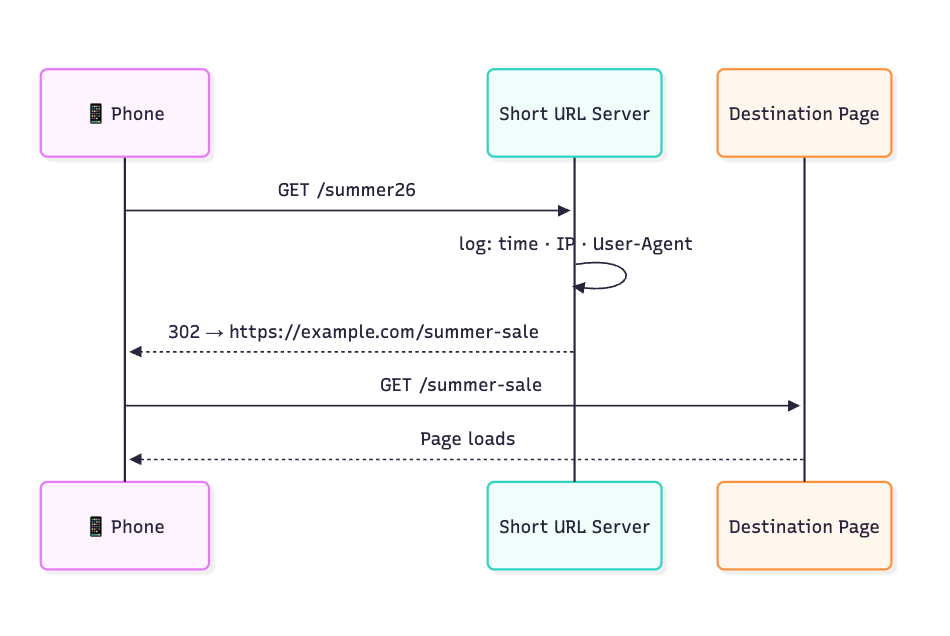
The redirect does two jobs. It's where the scan gets counted, and it's also why you can change a dynamic code's destination after printing: you edit where the short link points, and every printed copy follows. Tools such as Hovercode also let you use your own redirect domain instead of theirs.
If you run your own redirect, use a 302 or 307, which are temporary. A 301 is permanent and browsers can cache it, so a phone that scanned once may skip your server on later scans. MDN's own 301 example carries a 30-day cache.
Here's how the two compare:
| You want | Static | Dynamic |
|---|---|---|
| A scan count from your QR tool | No | Yes |
| To know which placement people came from | Yes, with a tagged URL per placement | Yes |
| To change the destination after printing | No, you reprint | Yes |
| Your own branded redirect domain | Not applicable | Yes, on plans that include one |
If you'll ever want a scan count or a changeable destination, the code has to be dynamic before it's printed. A static code can't be converted afterwards. If all you need is to know which flyer or banner people came from, a static code with its own tagged URL per placement does that job.
Dynamic codes come with one trade-off: the redirect runs on someone's server. If it's a hosted tool and your account lapses, or the vendor changes its terms, the short URL can stop working, and your 500 flyers stop working with it. A custom domain you own reduces that risk. It's also worth reading what the vendor's terms say happens to your links when you stop paying.
Not sure which kind you've already printed? Scanning one and reading the URL gives you a hint, since a short link on a QR vendor's domain suggests a dynamic code. But either kind can encode any URL. The reliable test is to open the tool that made the code: only dynamic codes have a scan dashboard.
What a scan tells you
Every scan of a dynamic code is one web request, and everything your QR tool reports comes from that request. Vendors advertise scan count, location, device type and time. Here's where each one comes from:
| What you see | Where it comes from |
|---|---|
| Scan count | Each request to the short URL |
| Time | When the request arrived |
| Device and operating system | The phone's User-Agent header |
| Location | The IP address the request came from |
Location needs a caveat: it reflects the network, not the person. A phone on the venue's Wi-Fi shows up at the venue's connection, and on mobile data the city can be wrong altogether, depending on the carrier.
It helps just as much to know what a scan can't tell you, because some dashboards imply more. IONOS, for example, lists "demographic" metrics. But a request carries no age, gender, income or name. Unless the visitor signs in at your destination and you tie that session back to the click, a scan stays an anonymous device at a rough location. It also can't tell you whether anyone read the page or bought anything later. Those answers come from what happens after the redirect.
Unique scans count devices
Most dashboards show two numbers: total scans and unique scans. Total is every request, repeats included. Unique groups requests by device. QR Code Generator describes its unique counter as tracking "the specific number of scans per device," and we couldn't find a standard definition beyond what vendors say.
So someone who scans your flyer on their phone and again on a tablet counts twice, and two people sharing one phone count once. Report unique scans as a device estimate. To compare placements of the same size, total scans is the cleaner number. A big gap between the two still deserves a look, because it means a lot of repeat requests.
When the numbers look too high
Some requests to your short link don't come from a person reading a flyer. We haven't measured how much each of these adds, but from how a redirect works, the usual suspects are:
- chat apps fetching the link to build a preview when someone shares it
- scanner apps that check a URL before the user opens it
- security scanners, which tend to come from cloud data centers
- the same person scanning twice
- you, testing the code before it went to print
A few checks catch most of it. Compare unique scans to total. Look at where the requests come from, since a data center isn't a phone in a convention hall. Watch for runs of identical non-mobile User-Agents. And discount the burst on the day you created the code; that was your own testing.
If your hosted tool shows only a count, a city and a device type, compare its scan count with sessions on your landing page. A wide gap is your cue to dig in.
Connecting a scan to a website visit
If the code leads to a web page, campaign parameters (UTM tags) let your analytics tie the visit back to the code. Put them on the destination URL you set in the short link, not on the short URL itself. The redirect forwards the visitor to the tagged page, and your analytics reads the tags from there.
Printed codes need three tags, plus a fourth once you have more than one placement:
| Tag | What it says | Example |
|---|---|---|
utm_source |
Who sent the traffic | flyer |
utm_medium |
The medium | qr |
utm_campaign |
The campaign | trade-show-launch |
utm_content |
Which placement | banner-entrance |
Two mistakes break most QR reports. First, values are case sensitive: Google's guidance is that utm_source=google and utm_source=Google are different values, and it recommends lowercase as standard practice. Second, every placement needs its own utm_content. Three banners all tagged banner give you three codes and one number.
Google also documents utm_id, utm_term and utm_source_platform, which rarely matter for print. To build tagged URLs without editing query strings by hand, ChottuLink's free UTM builder puts them together for you.
Connecting a scan to an app install
This is the harder half. The scan happens in a browser; the install happens in the App Store or Google Play. A plain store link carries nothing about the QR code into the app, so something has to pass it along, and Android and iOS do that differently.
Android
Add a referrer= value to the Google Play link the code ends up at, for example &referrer=utm_source%3Dflyer%26utm_medium%3Dqr. Google's Play campaign URL builder generates the format for you. When the app opens for the first time, the Play Install Referrer API hands that string back, along with when the click happened, when the install began, and the app version at first install.
Two things to plan for. The data "will be available for 90 days and won't change unless the application is reinstalled", and Google says to call the API only once, on the first run after install. You'll also need a Google Play Console account.
iOS
Apple's route is an App Store campaign link with a provider token and a campaign token:
https://apps.apple.com/app/apple-store/id123456789?pt=123456&ct=poster_summer26&mt=8
pt identifies your developer account, ct names the campaign, and mt is the media type. Give each placement its own ct, the same way you'd use a separate utm_content on the web. Apple says its analytics then "captures the impressions, product page views, downloads, usage, sales, and subscriptions tied to each campaign token."
What you get back is a total per campaign token, not a record of each scan, and the fine print matters for print campaigns:
- A first download only counts if it happens "within 24 hours" of the link being used.
- If someone clicks more than one of your campaign links "within a given timeframe, only the most recent link receives credit."
- Numbers don't appear until they reach "a minimum threshold of 5" in the date range you've selected, so a single poster in a quiet spot may never show up.
- "You can't generate a campaign link until your app has data," so a brand-new app can't measure from day one.
Campaign links also don't take anyone to a particular screen in your app. Apple's other attribution framework, AdAttributionKit, is built for ad networks, so it doesn't help with scanned codes.
Getting new users to the right screen
Both platforms leave one gap: a new user who installs from your QR code opens the app on its home screen, not on the offer they scanned. Deferred deep linking closes that gap. The link records where the user was heading before the install, and the app reads that record on first launch and opens the right screen.
On Android, the install referrer string survives into first launch, which is what makes this possible. On iOS, Apple's campaign reporting stays aggregate, so matching one scan to one install and one screen is the linking platform's job. ChottuLink's guide to QR code deep links covers the routing setup, and its link attribution page shows the click-to-install-to-revenue funnel this feeds.
A note on logging IPs
IP addresses are where the location data comes from, and logging them can be regulated. If you or your vendor log them, make sure that fits your privacy notice and how long you keep data. Which rules apply depends on where the people scanning are.
FAQ
Can you track who scanned a QR code? No. You can see that a device scanned it, when, and roughly where. Knowing who it was requires them to sign in at your destination, with that sign-in tied back to the click.
Can I track QR scans in Google Analytics? The web visit, yes. Tag the destination URL and the session shows up in GA4 with your campaign data. Expect fewer sessions than scans, since some people leave before the page loads or block analytics. GA4 may also file utm_medium=qr under Unassigned, the label it uses when there are no other channel rules that match, so create a custom channel group if you want QR as its own line. An app install isn't a web session, though, so web tags won't capture it.
Do I need a dynamic code to track app installs? No. A static code that opens a Google Play link with &referrer=, or an App Store campaign link with pt and ct, attributes installs on its own. A dynamic code adds one code that works for both platforms, a scan count, and routing to a specific screen after install.
Do QR codes work without an internet connection? Only if the code holds plain text or Wi-Fi details. Any code that opens a URL needs a connection, static or dynamic.
Is there a free way to track QR scans? Most QR tools include scan counts on their free tiers. On ChottuLink, QR codes are unlimited on every plan, including the free one, and "each QR code tracks scans, device type, and geographic data", with a custom branded domain on the free plan as well. Links, clicks and app installs are free and unlimited; deeper reporting such as cohort data and install attribution starts on the Indie plan. See pricing for current limits.
Before your next print run
- Decide static or dynamic first. A printed static code can't be converted. If its URL is on your own domain, though, you can still add a redirect there later.
- Give every placement its own tag: a separate
utm_contenton the web, a separatecton iOS, a separatereferrervalue on Android. - Use a 302 or 307 if you run your own redirect.
- Carry the campaign into the store link if installs are the goal.
- Scan each code yourself before it's printed, and discount that test when you read the numbers.