
Instagram Deep Links Not Opening Your App? Here's Why and How to Fix It
Instagram and TikTok run their own in-app browsers that block Universal Link and App Link handoffs. This guide explains the root cause and three working fixes, including ChottuLink's automated IAB detection.

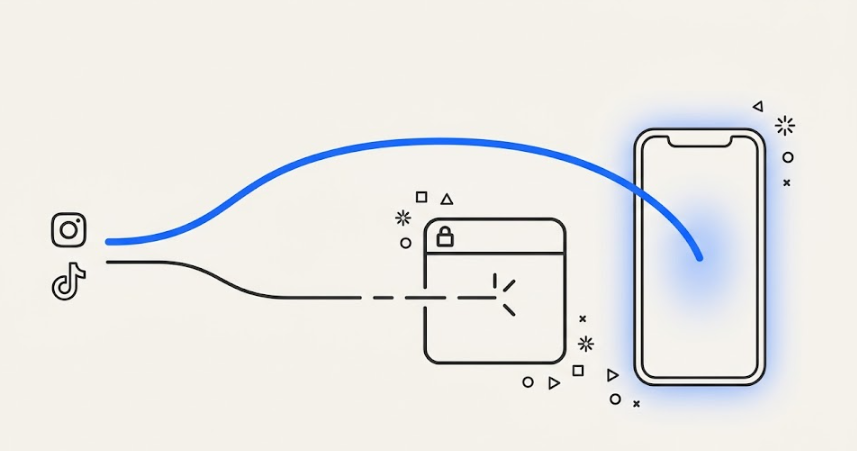
Your Instagram deep link is not broken. The in-app browser is blocking it. This guide explains why Meta and TikTok IABs suppress Universal Links and App Links, which fixes actually work in 2026, and how to set up IAB-resilient links with ChottuLink in five steps.
The Short Answer
When a user taps a link inside Instagram or TikTok, the platform loads it inside its own in-app browser rather than passing it to Safari or Chrome. That browser suppresses the OS-level handoff that Universal Links and App Links depend on, so a user who has your app installed lands on a mobile web view instead.
Three approaches reliably fix this: an "Open in Browser" intermediate page, automated handoff detection (ChottuLink's default path), and a QR fallback for desktop-to-mobile campaigns.
Why This Happens:
What Is Instagram IAB?
IAB stands for in-app browser: the built-in web view Instagram (and TikTok, Facebook, and Messenger) opens links in in place of your phone's default browser. When you tap a link inside the Instagram app, it opens inside this in-app browser instead of Safari or Chrome, which is what breaks the handoff to Universal Links and App Links.
The In-App Browser Problem
When a user clicks a link from Safari, the OS processes the URL, checks whether an installed app claims that domain, and opens the app directly. That is how Universal Links (iOS) and App Links (Android) are supposed to work.
Instagram and TikTok break that chain. Both platforms route link clicks through their own in-app browsers (IABs) rather than handing them to the system browser. The IAB intercepts the URL before the OS sees it, and IABs frequently suppress the intent signals that would trigger the native app.
From the platform's perspective, the IAB serves two purposes: keeping users one swipe from the feed (retention), and injecting scripts to observe behavior on third-party sites (tracking). Neither goal requires handing off to a native app, so the platforms suppress it.
The result for you: your analytics show a click, but the user ends up on a mobile web view they do not recognize, are not logged into, and cannot buy from. The conversion is lost silently.
Which Platforms Are Affected
| Platform | IAB Aggressiveness | Notes |
|---|---|---|
| High | Most reported handoff failures | |
| TikTok | Very High | Attribution loss is common; creator ROI is understated |
| Facebook / Messenger | Medium-High | Varies by placement and link type |
| Medium | More permissive; still benefits from detection logic | |
| Low-Medium | Less common for consumer app flows |
ChottuLink also covers Samsung Internet, Huawei Browser, and Vivo Browser , environments that competitors do not document. That matters for brands with South Asian or APAC user bases.
Three Working Fixes
Fix 1: "Open in Browser" Intermediate Page
The simplest manual approach. Instead of pointing the link directly to its destination, you point it to a lightweight HTML page with a prominent "Open in Browser" button.
A user-initiated tap on a button is a stronger trigger for OS handoff than an auto-redirect. IABs are less likely to suppress an action the user explicitly took.
The trade-off is friction. An extra tap before the user reaches your content costs conversions. Use this approach as a fallback for audiences where the automated path cannot fire, not as the primary solution.
Fix 2: ChottuLink Automated IAB Handoff
ChottuLink detects the IAB from the User-Agent on every click, then fires a sequenced handoff: Universal Link intent first, then App Link intent, then a URI-scheme trigger where useful. The right combination, in the right order, gets through most IAB versions even when a single technique fails on its own.
The key differentiator: ChottuLink monitors Meta and ByteDance browser updates continuously and adjusts the handoff script when behavior changes. Your team does not ship an app update. The fix propagates on the platform side.
This is the default path for ChottuLink customers on social campaigns.
Fix 3: QR Code Fallback for Desktop-to-Mobile
Some campaigns get clicked on desktop: paid social on a laptop, email on a work computer. The user's app and payment method are on their phone. A QR code bridges the gap.
When a ChottuLink link is clicked on desktop, you can have it land on a webpage, that renders a branded QR code. The user scans with their phone, the link resumes its mobile path, and the app opens normally. ChottuLink generates QR codes natively per link, so no separate QR tool is needed.
This is not strictly an IAB fix. It is a hygiene step for any campaign that crosses devices.
Step-by-Step: IAB-Resilient Links with ChottuLink
Step 1: Configure a Branded Domain
In the ChottuLink dashboard, point a custom subdomain (links.yourbrand.com or go.yourbrand.com) to ChottuLink. Social-app filters flag branded domains less aggressively than generic short-link domains. They also read as more trustworthy to users before they tap.
See branded-short-links for setup steps.
Step 2: Create the Deep Link and Set Platform Behavior
In the dashboard, create a new link and configure the iOS destination and the Android destination independently. Set the fallback (for users without the app) to your App Store or Play Store listing, or to a web destination if the content exists there.
Step 3: Set Social Meta Tags
A link with a generic preview gets fewer clicks before the IAB problem even comes into play. ChottuLink lets you override the OG image, title, and description. Use link-preview-checker to validate how the link renders on each platform before publishing.
A practical tip: include an "Open in App" affordance in the OG image so users already expect to be taken to the app when they tap.
Step 4: Enable Deferred Deep Linking
New users who do not have your app installed will be sent to the App Store or Play Store. Without deferred deep linking, they land on the app home screen after installing. With it, they land on the screen the link pointed to, even if the install happens hours later.
ChottuLink's deferred deep linking uses server-side matching, not device fingerprinting or IDFA. It works under iOS ATT without requiring tracking permission.
See deferred-deep-linking for the full setup.
Step 5: Test from Inside the IAB
Do not rely on a browser test alone. Open Instagram on a physical device, share the link to your own DMs, and tap it from there. Repeat in TikTok, WhatsApp, and Messenger. Check the ChottuLink dashboard's recent-clicks log to confirm which routing path fired on each platform. The simulator will not surface IAB behavior.
Influencer Attribution on TikTok
TikTok's IAB is one of the more aggressive ones, and TikTok is also the channel where attribution matters most for many brands. The combination is difficult: high-value clicks routinely lose context when the handoff fails.
The pattern that works is unique-per-creator ChottuLink links combined with deferred deep linking:
- Each creator gets a distinct short link.
- A new fan clicks the link from inside TikTok and reaches the App Store (because they do not have your app yet).
- ChottuLink records which creator drove that click.
- After install, the user lands on the product the creator was promoting.
- ChottuLink attributes the install to the creator through features/link-attribution, even if it fires hours after the click.
This is the only reliable way to calculate creator ROI on mobile-first campaigns. Click counts alone do not capture installs that happen via the App Store detour.
Why DIY Handoff Scripts Break Over Time
A common pattern: a team builds a redirect server with a JavaScript handoff. It works at launch. Three months later, Instagram ships a browser update that alters how it handles redirects. Conversions drop 15 to 20 percent. Nobody notices for a quarter because the clicks still show up in analytics.
IAB handoff is a moving target. Meta and ByteDance update their browsers on their own schedule, and the techniques that work today require ongoing re-validation. Teams that replaced Firebase Dynamic Links with a DIY redirect setup are increasingly seeing this failure mode as those browsers continue to evolve.
A managed link platform exists specifically because continuous monitoring is expensive to do well in-house. ChottuLink updates its handoff logic without any action from your engineering team.
See the-complete-guide-to-replacing-firebase-dynamic-links if you are currently on a DIY FDL replacement.
Frequently Asked Questions
Why does my Universal Link work in Safari but not from Instagram?
Safari uses the iOS operating system's full link-handling stack. Instagram's in-app browser intercepts the tap and renders the URL inside its own webview instead, suppressing the OS handoff. The link is not broken. The IAB is filtering it before the OS sees it.
Does this also affect WhatsApp and Messenger?
Yes, to varying degrees. WhatsApp is more permissive than Instagram or TikTok but still benefits from the same handoff detection logic. Facebook Messenger falls between the two in aggressiveness.
Will this fix my links in iOS Mail?
The iOS Mail app uses the standard system link handler, so Universal Links generally work without special handling. The IAB problem is specific to social apps that run their own browsers.
Can I disable the Instagram in-app browser?
No. Meta and ByteDance control whether their IABs hand off to native apps. There has been regulatory pressure on this, but as of 2026 the IAB remains the default on both platforms.
What if the user has the app but is not logged in?
Deep linking handles the routing; your app handles authentication. Use deferred deep linking parameters to preserve the original destination across the login flow. The user lands on the right screen after they authenticate.
Is this why SMS links outperform Instagram links?
Yes. SMS opens links through the OS handler, not an in-app browser. That is also why branded short links matter most over SMS: the bottleneck is user trust in the domain, not IAB filtering. See why-rich-social-link-previews-can-boost-your-click-through-rate-by-up-to-150 for more on link trust and CTR.
Related Reading
- features/smart-redirection: how ChottuLink's IAB detection works
- features/deferred-deep-linking: preserving destination through App Store installs
- features/branded-short-links: custom domain setup
- link-preview-checker: validate social previews before publishing
- features/qr-codes: native QR generation per link
- features/link-attribution: per-creator analytics for influencer campaigns
- blog-posts/deep-link-use-cases-for-the-social-industry: broader social deep linking patterns
- blog-posts/why-rich-social-link-previews-can-boost-your-click-through-rate-by-up-to-150: link CTR and preview optimization